
When Information Architecture Becomes Invisible
How invisible architecture shapes culture and decision-making
Clarity doesn’t explode—it evaporates. (And everyone starts “just asking someone.”) Information Architecture (IA) is like plumbing: you don’t celebrate it when it works, but you definitely notice when it doesn’t. Most organizations don’t experience an “IA outage.” They experience a slow increase in friction: more hunting, more rework, more questions, more second-guessing. (The kind of inefficiency that never gets a ticket, because it’s “just how things are.”)
From a 30-year IA perspective, the most common failure mode is invisibility. Teams don’t know they have an IA problem; they think they have a “communication problem,” a “training problem,” or a “tool problem.” And sometimes those are true—but very often the underlying issue is that the system no longer matches how humans think.
That’s an HCI problem as much as it is an IA problem: misaligned mental models create cognitive load, and cognitive load creates errors, avoidance, and distrust.
Real-World Signals That IA Is Fading
These show up across industries—SaaS, healthcare, nonprofits, education, ministry ops, internal IT—anywhere knowledge must scale.
Signal 1: “Where do I find…?” becomes a daily workflow
People stop searching and start asking because asking is faster than navigating uncertainty. This is a form of learned behavior: systems become “optional,” and social networks become the real interface.
Signal 2: The org develops “human routers”
Every team has a person who “knows where everything is.” That person becomes a single point of failure. When they leave, the organization experiences knowledge amnesia.
Signal 3: Duplicates multiply—and no one is sure which is true
A policy exists in two places. A process doc exists in three versions. A “final” slide deck has six variants. This isn’t a discipline problem. It’s a structure and lifecycle problem.
Signal 4: Navigation reflects org charts, not tasks
Many intranets and knowledge bases are organized around departments (“Marketing,” “Engineering,” “Operations”). Humans, however, are usually task-oriented (“Launch a campaign,” “Handle an incident,” “Onboard a vendor”). When structure forces translation, users disengage.
Signal 5: Teams create their own micro-taxonomies
Engineering uses one set of terms, Product uses another, Support uses another, and soon “incident,” “issue,” “bug,” and “outage” become interchangeable—or contested. This is classic taxonomy drift.
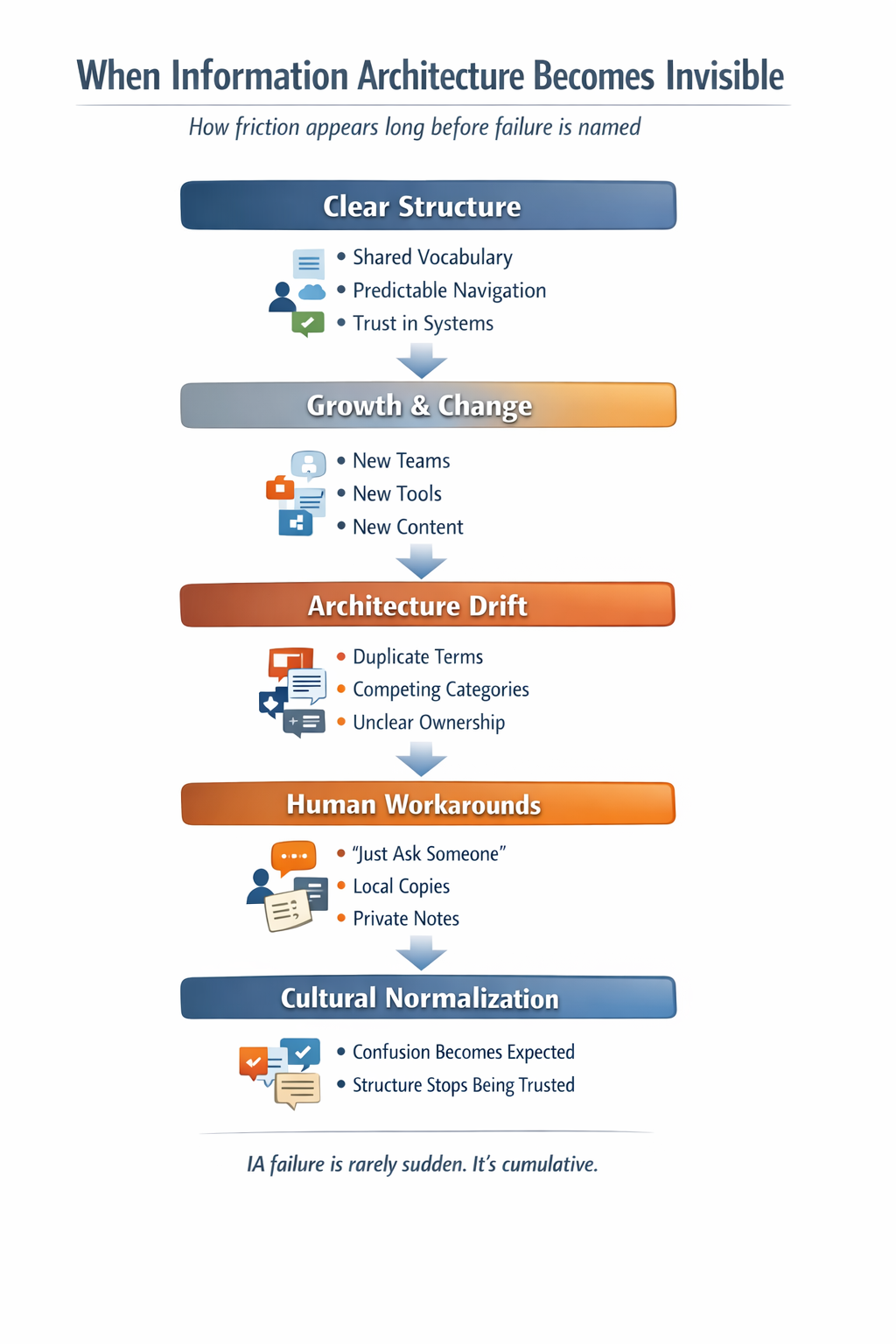
Information Architecture Progression Diagram
Figure 1. Information architecture failure is rarely sudden. As systems grow and change without stewardship, structure drifts, workarounds emerge, and confusion becomes normalized across teams.
Why This Happens (The Quiet Architecture Debt)
IA becomes invisible because it’s treated as:
a one-time deliverable (“we built a wiki”)
a tooling decision (“we moved to Confluence/Notion/SharePoint”)
a cleanup project (“we’ll reorganize later”)
But IA is a living system. Content grows, teams change, products evolve, compliance requirements shift. Without stewardship, structure decays.
This is where Human Factors matters: when systems are built without recognizing how people actually behave under time pressure, the system fails in predictable ways. People will choose the path of least cognitive resistance. If your IA requires constant interpretation, users will route around it.
Visual: IA Drift Map (Build-Ready Diagram)
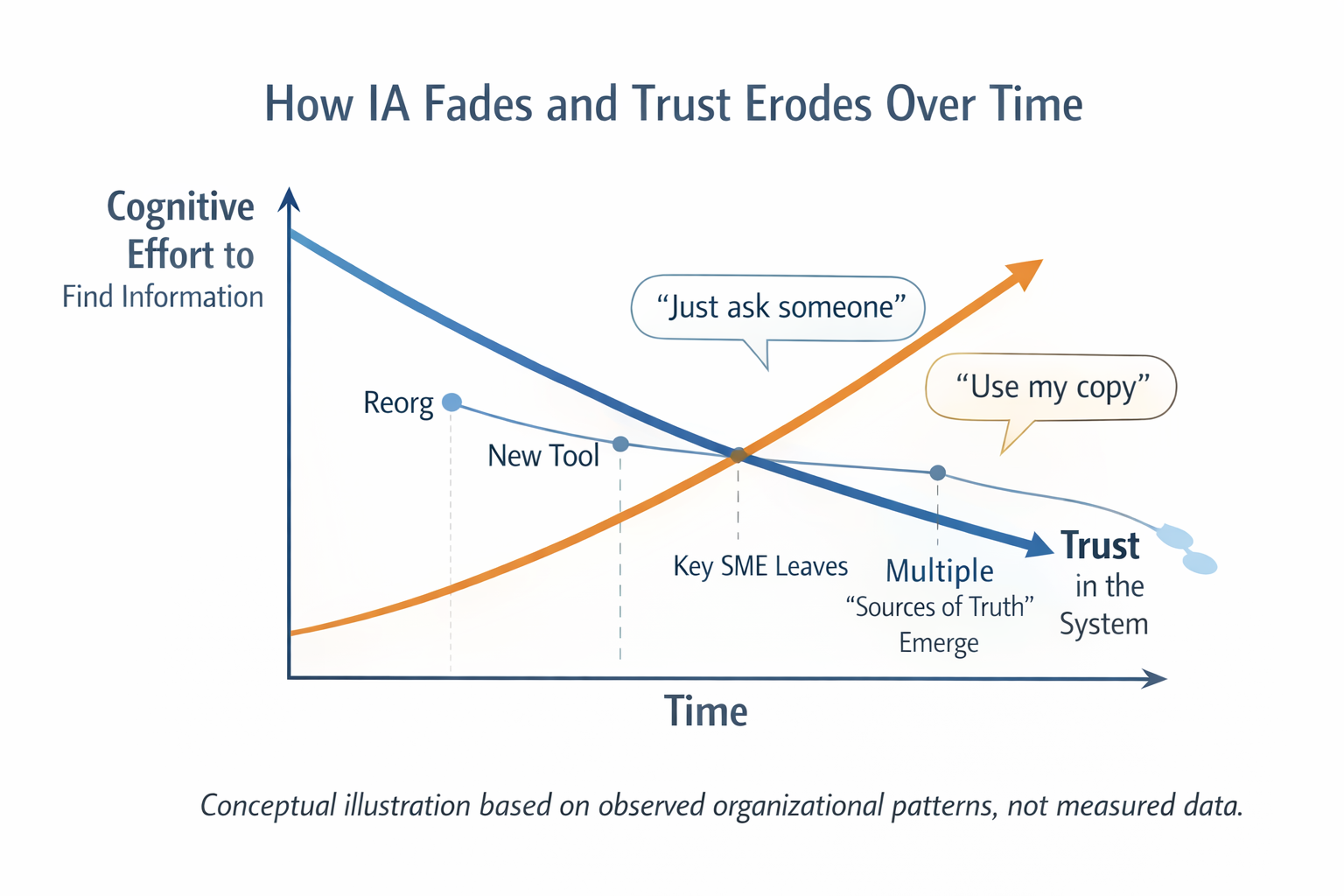
Cognitive Effort vs. Trust
Figure 2. Conceptual illustration of how cognitive effort increases and trust in systems declines over time when information architecture no longer aligns with human mental models. This pattern reflects observed organizational behavior, not measured data.
Diagram: How IA Drifts Over Time Explained
Diagram Title: How IA Drifts Over Time
Format: A simple timeline with four layers
Content Growth (line steadily rising)
Vocabulary Drift (line jagged, diverging)
Findability (line declining)
Workarounds (line rising)
Annotations at key points:
“New tool introduced”
“Reorg”
“New compliance requirement”
“Key subject-matter expert leaves”
“Teams create parallel spaces”
Caption: “IA failure is usually gradual. The pain is real long before it’s acknowledged.”
The Fix Isn’t “Reorganize Everything”
Big-bang reorganizations can work, but they often fail because they address “where content lives” rather than “how humans find and understand.”
Instead, think in HCI terms:
Wayfinding: Can users orient quickly? (Where am I? What’s here? What’s next?)
Recognition over recall: Do labels help users recognize the right path without guessing?
Error prevention: Does the system prevent duplication and conflicting versions?
These aren’t abstract principles; they’re everyday usability behaviors.
Step-by-Step: A Leader’s Approach to Restoring Findability
Step 1: Identify high-friction journeys
Pick 3–5 recurring tasks:
onboarding a new hire
responding to an incident
publishing a policy update
releasing documentation
setting up a partner/vendor integration
Map where people actually go to complete them. The gaps will show themselves.
Step 2: Define a controlled vocabulary (minimum viable)
You don’t need a 400-term taxonomy to start. You need agreement on the terms that cause the most confusion. Create a short “terms we use” list and publish it where teams work.
Step 3: Establish content types and intent
Separate:
Policy (rules)
Procedure (steps)
Reference (lookup)
How-to (task execution)
Conceptual overview (mental model)
When content types blur, users can’t predict what they’ll get when they click.
Step 4: Add lifecycle cues
Every important page needs:
owner
last reviewed
next review date
version or change notes (lightweight)
This is not bureaucracy; it’s trust-building.
Step 5: Create one “front door” per domain
A domain is a coherent subject area (e.g., “Child Protection,” “Security,” “Design System,” “Fundraising Ops”). Each domain needs one authoritative entry point. Otherwise, people don’t know where to start.
Taxonomy Tip: Avoid “Miscellaneous” Like It’s a Bug
“Misc” is the most honest label in the world—and the least useful. It’s a tax on future findability. If you must have a catch-all, constrain it:
time-box content there (must be reclassified within 30 days)
assign an owner
treat it as an inbox, not a category
Final Thoughts
When IA is healthy, it’s invisible in the best way: people find what they need, do their work, and move on. When IA drifts, the organization starts spending its attention budget on navigation instead of mission.
And attention is one of the most expensive resources you have.
References (Foundational):
Wurman, Information Anxiety (information overload and comprehension gaps): https://www.wurman.com/books/information-anxiety (Redish)
Rosenfeld, Morville, Arango, Information Architecture: For the Web and Beyond: https://books.google.com/books/about/Information_Architecture.html?id=dZaJCgAAQBAJ (Google Books)
Morville, Ambient Findability (findability and wayfinding): https://www.amazon.com/Ambient-Findability-What-Changes-Become/dp/0596007655 (Amazon)
